

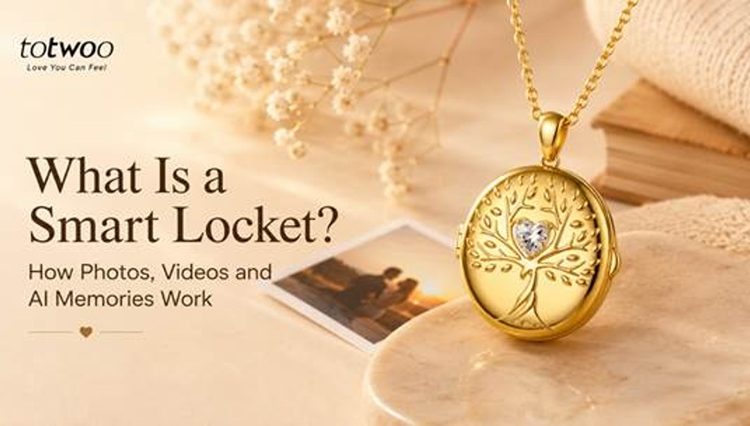
Traditional lockets usually hold one or two printed photographs. A smart locket adds a digital display, rechargeable electronics and app-based content management, allowing the wearer to view selected photos, short videos or animated memories inside the pendant.
However, “digital locket” and “smart locket” are not standardized product categories. Different manufacturers use these terms for different features. Before buying, it is important to understand where the content is stored, how it reaches the pendant and whether the locket requires an app, Bluetooth or an internet connection.
Traditional Locket vs Digital Locket vs Smart Locket
These three terms describe related but different types of jewelry.
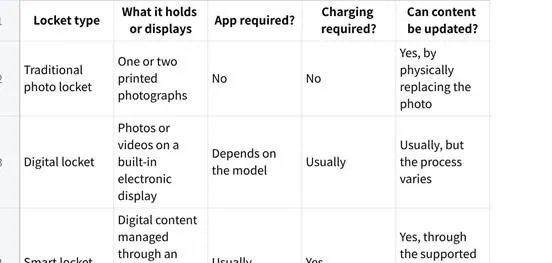
A traditional locket is the simplest option. It contains no screen, software or electronic storage.
A digital locket is a broader category for pendants that display electronic media. Some use internal storage, while others may depend on a phone, memory card, NFC link or cloud-based service.
A smart locket normally adds app-based controls, wireless syncing or content-creation tools. The word “smart” does not guarantee any particular feature, so shoppers should still check the exact product specifications.
Where Are the Photos and Videos Stored?
The answer depends on the product.
With the Tree of Life AI Smart Locket, the process begins on a phone. The user selects or creates content in the Totwoo App and then transfers it to the locket through Bluetooth.
After syncing, the selected media is stored locally on the locket itself and appears on the digital screen inside the pendant. The phone does not need to remain beside the locket during normal viewing.
According to the current setup instructions, content history is also stored locally in the uploader’s app rather than being placed in a public photo library. If the wearer later uploads different media, the content stored on the locket is replaced.
This is different from a necklace that merely opens a webpage or retrieves media from the internet whenever it is scanned.
How Does a Smart Locket Work?
The exact process varies by model. The Tree of Life locket currently works through the following steps.
Step 1: Charge the Locket
Charge the pendant before its first use with the included magnetic USB charging cable. A sufficient battery level is also important when transferring larger files.
Step 2: Install the App
Download the Totwoo App on a compatible iOS or Android phone and sign in to an account.
The app is required to connect the locket, select media, create an AI moving memory and replace previously transferred content.
Step 3: Connect Through Bluetooth
Turn on the phone’s Bluetooth, open the locket and follow the connection instructions in the app. The app should recognize the nearby pendant and connect to it.
Bluetooth is the connection used to transfer media from the phone to the locket. Keep the phone close to the pendant and avoid closing the locket or leaving the transfer page until syncing is complete.
Internet access should be available when downloading the app, signing in or using AI-generation features. Once the finished media has been transferred and stored locally, normal playback does not require a continuous phone, Bluetooth or internet connection.
Step 4: Choose a Memory Mode
The current model supports three main content formats:
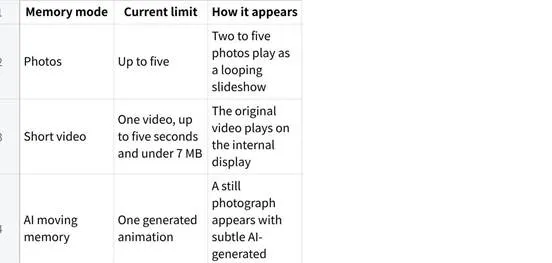
These are alternative modes rather than one combined media library. For example, selecting a short video does not mean that five additional photos will also remain available at the same time.
Step 5: Prepare and Transfer the Content
Photos and videos can be selected from the phone’s gallery or captured with its camera. Before transferring them, crop the content so the main person, pet or subject fits inside the display frame.
Clear, well-lit and front-facing photographs generally produce better results, particularly when creating an AI animation.
The official instructions recommend keeping the phone near the locket, maintaining the Bluetooth connection and ensuring that the pendant has at least 20% battery during transfer.
Step 6: Open the Locket to View the Memory
The screen is located inside the pendant. Opening the locket automatically activates the display and plays the transferred content.
A touch point beneath the screen provides additional controls:
• In photo mode, tapping it moves to the next image.
• In video mode, tapping it after playback restarts the video.
• If the screen has turned off, tapping the touch point wakes it again.
The display switches off shortly after playback to conserve battery.
Step 7: Replace the Content Later
The media is not permanently fixed inside the pendant. The user can return to the app, select different content and transfer it to the locket.
Previously created media may also be available through the app’s local history. Uploading new content replaces the memory mode currently stored on the pendant.
What Is an AI Moving Memory?
An AI moving memory begins with a still photograph. The app analyzes the image and generates subtle movement, such as natural-looking facial expressions or gentle motion.
It is important to understand what this feature does not do. It does not recover an actual video of the photographed moment. It creates a new animated interpretation based on the uploaded image.
The current Tree of Life model includes ten AI memory creations. Previously generated animations can be reused from the app’s history without consuming another creation, according to the official smart locket setup guide.
AI animation may suit a family portrait, pet photograph or positive milestone. For sensitive remembrance gifts, consider whether the recipient would find an animated image comforting. A static photograph may be the more appropriate choice for some people.
A Smart Locket Is Not the Same as Connected Touch Jewelry
A smart locket and a long-distance touch necklace serve different purposes.
A touch necklace is designed for communication between two people. Depending on the model, one person can send a signal that produces light or vibration on the other person’s jewelry.
A smart locket focuses on memory viewing. It stores selected photos, a short video or an AI-generated animation that the wearer can open whenever they choose. It does not require another person to send a live signal each time the content is viewed.
In simple terms:
• Touch jewelry is for real-time interaction.
• A smart locket is for preserving and revisiting selected media.
• A traditional locket is for carrying a printed photograph without electronics.
Why Use a Smart Locket Instead of a Phone?
A phone can hold thousands of photographs, but its camera roll also contains screenshots, downloads and everyday images. Important memories can quickly become difficult to find.
A memory necklace creates a more selective experience. Instead of carrying an entire photo archive, the wearer chooses a small number of people, pets or moments to display.
Opening a pendant is also different from scrolling through a phone. The action is intentional, private and connected to a physical piece of jewelry.
A smart locket is not intended to replace a phone’s storage. It turns a carefully selected memory into something wearable.
What Can You Put in a Smart Locket?
Possible content includes:
• Couple or wedding photographs
• Images of children or grandchildren
• Family milestones
• A beloved pet
• Travel memories
• Graduation or reunion moments
• Photographs shared with a close friend
• A short personal video
• A respectful remembrance image
• An AI animation created from a suitable photograph
The available content should not be filled randomly. A focused set of related images usually creates a clearer story than five unrelated photographs.
Can a Smart Locket Be Preloaded as a Gift?
Yes, although the available process depends on the seller and model.
For the Tree of Life locket, the buyer can receive the pendant first, connect it to the app and upload the content before giving it to the recipient.
Totwoo also currently provides a “Customize Locket” option in the app for buyers who want to submit media after ordering and have the locket prepared for direct delivery. Shoppers should review the latest ordering instructions before relying on this option.
Preloading can make the gift easier to understand because the recipient sees the selected memory as soon as the pendant is opened. A short note explaining why the content was chosen can add useful context.
Tree of Life AI Smart Locket Specifications
The current product information lists the following details:
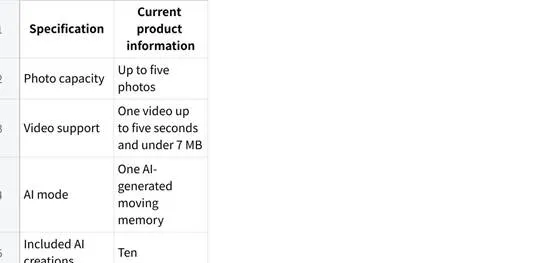
Battery performance can vary with playback frequency, screen use and charging habits.
The Tree of Life motif is commonly associated with family, growth and connection. That symbolism can complement the memory function, but it should remain secondary to the recipient’s style and the content placed inside.
What to Check Before Buying a Smart Locket
Before ordering, confirm:
• Whether the pendant has an internal display
• Which photo and video formats it supports
• Whether different media types can be stored together
• The maximum number and size of files
• Whether an iOS or Android app is required
• How the phone connects to the pendant
• Whether content is stored locally or retrieved online
• Whether playback works without a nearby phone
• How content is replaced
• Battery life and charging method
• Pendant dimensions, weight and chain length
• Whether the locket can be preloaded before gifting
• Warranty, return and privacy information
Do not rely on the word “smart” alone. The product page and setup guide should explain the complete journey from selecting a file to seeing it on the pendant.
Who Is a Smart Locket Best For?
A smart locket may suit someone who:
• Enjoys necklaces and larger pendants
• Wants to carry several selected photographs
• Would appreciate a short video or animated image
• Is comfortable using an app
• Does not mind periodic charging
• Wants to update the content as life changes
A traditional photo locket may be better for someone who dislikes apps, wants no charging requirements or prefers the permanence of a printed photograph.
A Familiar Keepsake With a Digital Display
A smart locket combines the familiar form of a photo locket with an internal screen, rechargeable battery and app-managed media. In Totwoo’s current implementation, the user selects content on a phone, transfers it through Bluetooth and opens the pendant to view the locally stored memory.
For someone who wants more than one printed photograph-and is comfortable with an app and occasional charging-the Tree of Life AI Smart Locket provides a concrete example of how this category works. The value ultimately comes from choosing content the wearer will genuinely want to revisit.